 MarcoPlot
Free WordPress plugin
MarcoPlot Booking Venue
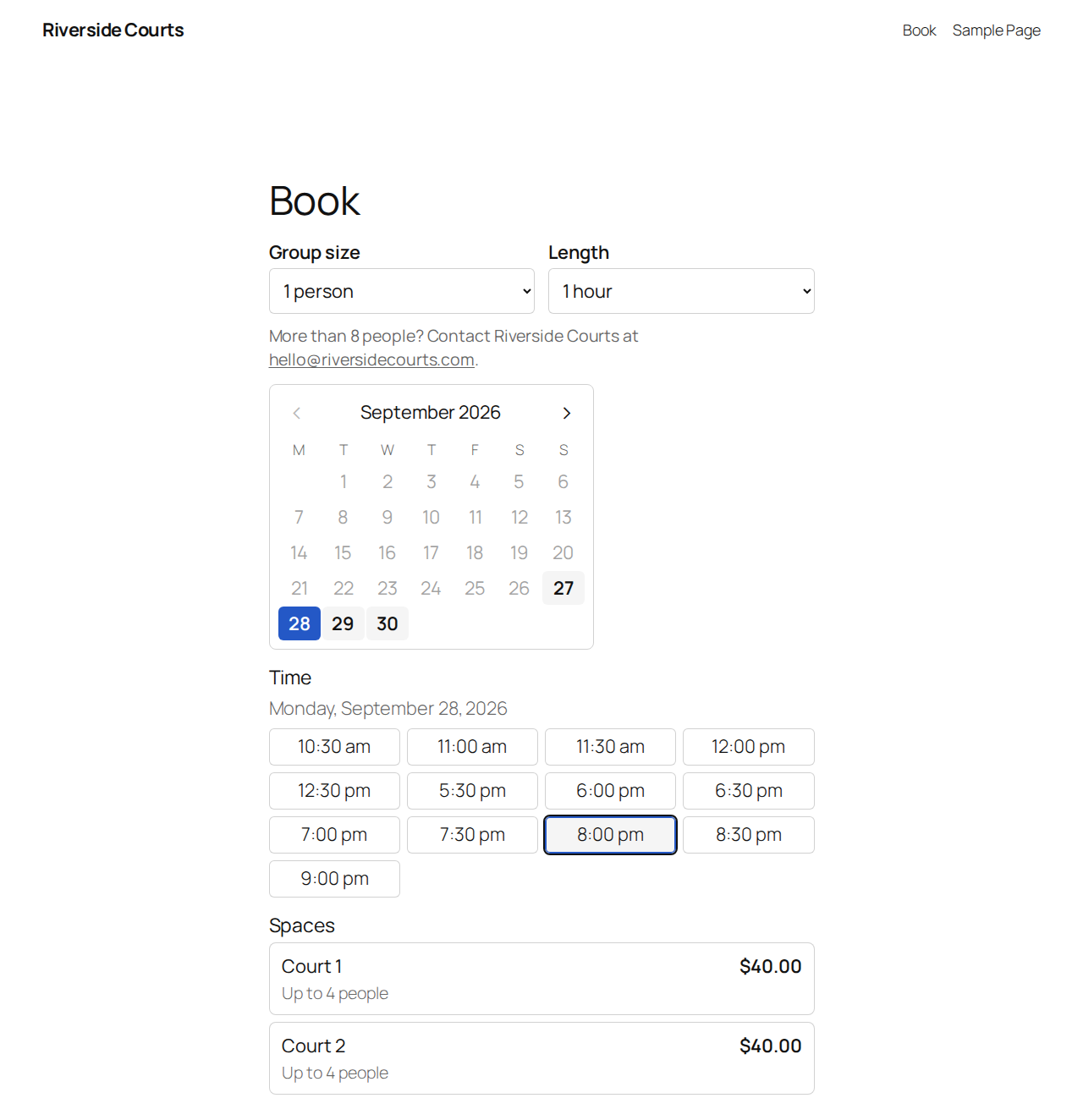
For businesses that rent out a space by the hour: tennis and padel courts, meeting rooms, music and photo studios, karaoke rooms, party rooms. Guests choose the number of people, a date, how long, a start time and the space they want, then pay with Stripe or PayPal. You see every booking on one schedule, take bookings at the desk, and refund to the card from the booking.
A tennis and pickleball club with two weeks of bookings. You get your own copy, signed in as the owner; it is removed after 15 minutes without use.
Not yet in the WordPress.org directory
It will be free to download from the WordPress.org plugin directory. The link goes here on the day it is listed.
For guests
- One booking page: people, date, length, time, space, details, payment. Add it to any page with a block or a shortcode.
- Only times that really fit are shown: opening hours, closed dates, cleanup time between bookings, the notice you need and how far ahead guests can book.
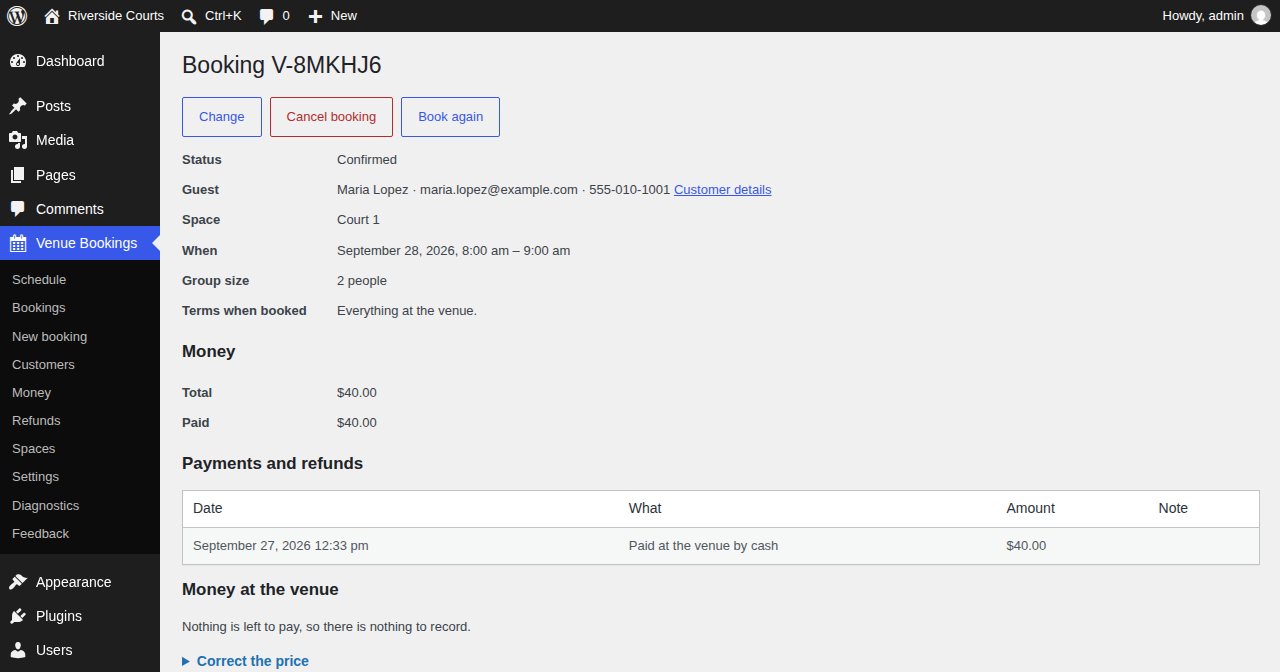
- A page for each booking: the guest can see it, add it to their calendar, or cancel it within your rules.
- Name, phone and email are checked before the booking goes through: a country-code picker for the phone, and an email check that catches domains that can't receive mail and suggests fixes for common typos. You can also turn on a one-time code to the guest's email before they can submit.
- Emails for confirmation, reminder, change, cancellation and refund.
For you
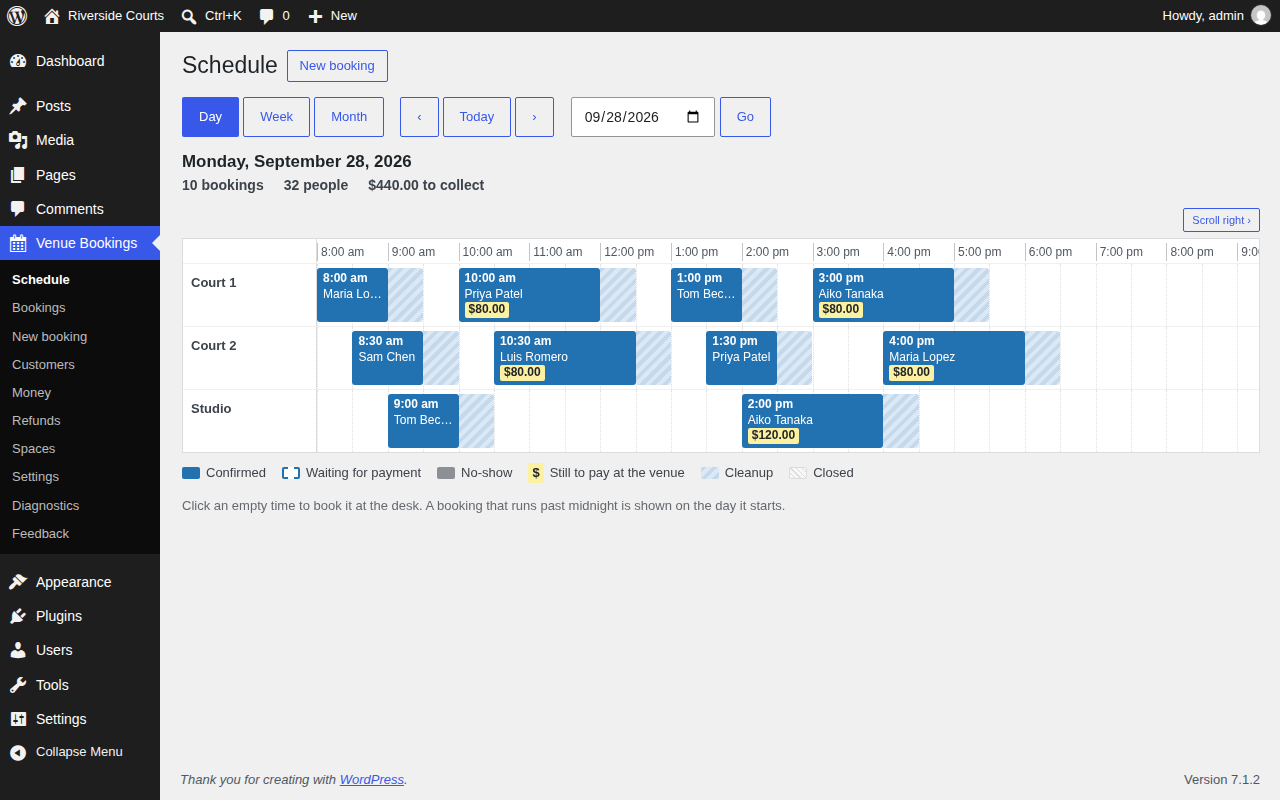
- The schedule by day (one lane per space), week and month, and a searchable list of bookings. Drag a booking on the day schedule to a new time or space; it snaps to the next valid start time.
- The desk: take bookings, change or cancel them, and mark no-shows.
- Payments by Stripe or PayPal, through your own account: full payment, a deposit, or pay at the venue. Refunds to the card from the booking, or from one Refunds page that marks every paid cancellation eligible or not and lets you refund or decline.
- Your currency and sales tax: pick from 20 currencies, including ones with no decimal places like the Japanese yen. Add one sales tax rate and name; it shows separately on Stripe receipts.
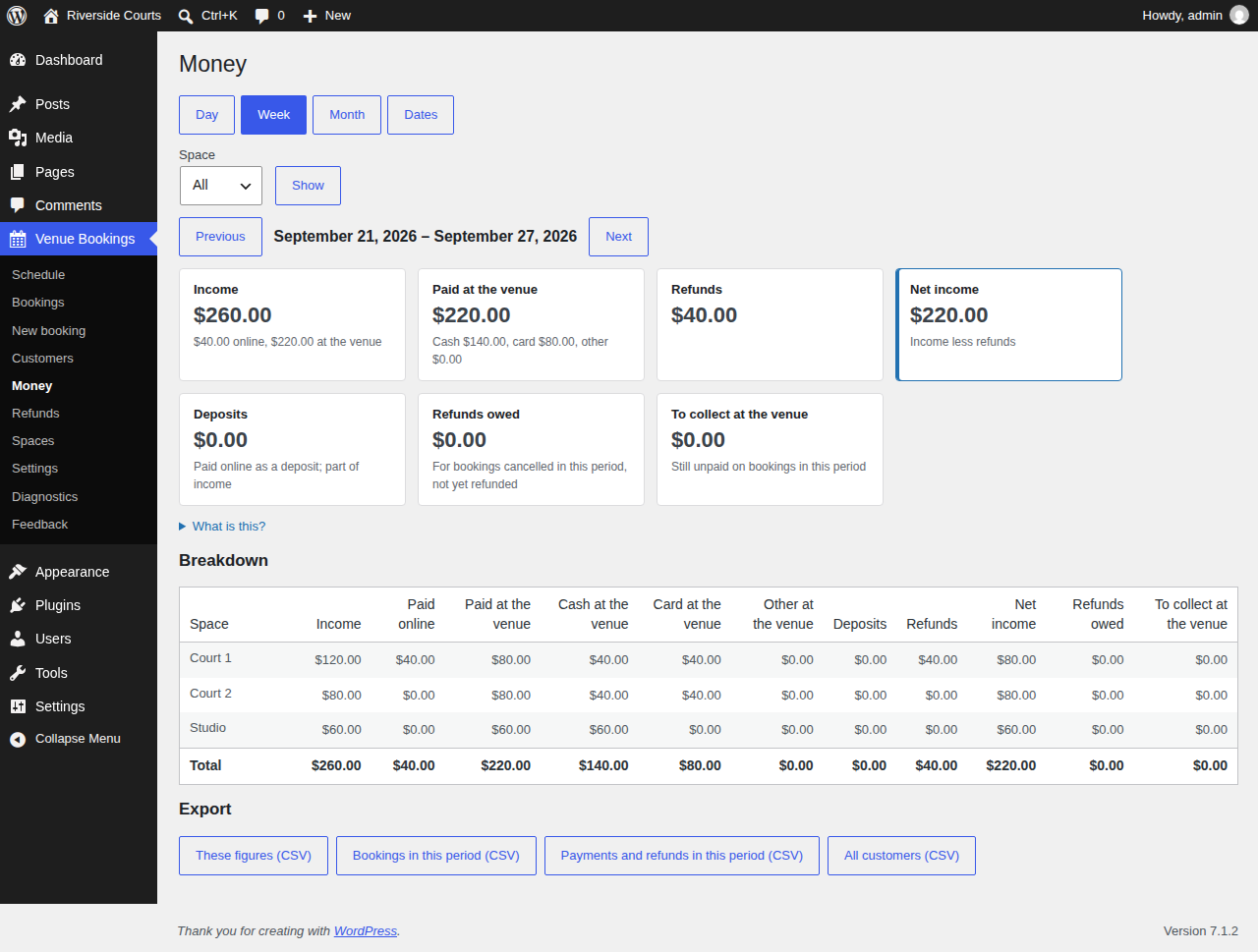
- Reports for money, bookings, guests, cancellations, no-shows and spend per person, by day, week, month or any dates, split by space, and CSV export of bookings, customers, payments and figures.
- Your own questions on the booking form. Answers show on the booking, in your notification and in the guest's confirmation.
- A private calendar feed of your bookings for your phone.
- Customers with total spend, tags and no-shows, and their booking history; email one guest straight from their page. Personal data export and erasure through the WordPress tools.
- Customer tags: Regular after 5 completed bookings across your MarcoPlot plugins, VIP by hand, and Blacklist automatically at a second no-show or by hand. A blacklisted guest booking online pays in full where you take deposits, or waits up to 12 hours for your OK where you take no money online.
- Notifications and email: send your new-booking and cancellation notices to several addresses, send from your own address, and resend a guest's upcoming confirmations after you fix their email.
- All your booking-page settings on one screen, with a live preview that updates as you change them.
- A setup wizard, and a Diagnostics page that checks scheduled tasks, time zone, tables and payments and fixes what it can.
Spaces and times
- Each space has its own capacity, minimum group size, price (per hour, per person per hour or per booking), a shortest booking length with longer lengths in steps of it, and cleanup time, and can have its own opening hours.
- Start times come from a scheduling method tuned over 120,000 simulated business days, so less time sits empty between bookings, or from fixed sessions on a set timetable if you prefer that.
- Groups are matched to spaces so that big groups still find a big room and no space goes to waste.
- Opening hours can run past midnight.
- The admin uses your own word for spaces — court, room, studio — everywhere it appears.
How it compares
The WordPress plugins most used for renting spaces by the hour, compared with MarcoPlot Booking Venue: first the free versions, then the paid ones.
Free versions
| MarcoPlot Booking Venue | Booking Calendar | Appointment Hour Booking | WooCommerce Bookings | |
|---|---|---|---|---|
| Price | Free | Free | Free | No free version |
| Online card payments (Stripe) | Yes | No | No | — |
| Online card payments (PayPal) | Yes | No | No | — |
| Deposits | Yes | No | Not stated | — |
| Refunds to the card from the booking | Yes | — | — | — |
| Sales tax | Yes | No | Not stated | — |
| Currencies | 20, including zero-decimal currencies | Not stated | Not stated | — |
| Book a space by the hour for a group size | Yes | No | Yes | — |
| Start times offered to guests | Optimized by simulation | Fixed list | Fixed grid | — |
| Cleanup time between bookings | Yes | No | Not stated | — |
| Several spaces side by side on one schedule | Yes | No | Not stated | — |
| Drag a booking to reschedule | Yes | Not stated | Not stated | — |
| Guest cancels from a link | Yes | No | No | — |
| Email verification before booking | Yes | Not stated | Not stated | — |
| Your own questions on the booking form | Yes | Yes | No | — |
| Calendar feed of your bookings | Yes | Yes | Yes | — |
| Customer tags, blacklist or no-show protection | Yes | Not stated | Not stated | — |
| Reports or analytics | Yes | No | Yes | — |
Paid versions
| Venue Pro | Booking Calendar Business Large | Appointment Hour Booking Professional | WooCommerce Bookings | |
|---|---|---|---|---|
| Price for one site | $99 a year; $79 a year for the first 100 | $349 once, with 6 months of updates | €59 a year | $249 a year, plus $219 a year for Deposits |
| Online card payments (Stripe) | Yes | Yes | Yes | Yes, with the free Stripe gateway |
| Online card payments (PayPal) | Yes | Yes | Yes | Yes, with the free PayPal Payments extension |
| Deposits | Yes | Yes | Not stated | With Deposits |
| Refunds to the card from the booking | Yes | Not stated | Not stated | Yes |
| Sales tax | Yes | Yes | Not stated | Yes |
| Currencies | 20, including zero-decimal currencies | Yes | Not stated | Yes |
| Book a space by the hour for a group size | Yes | Yes | Yes | Yes |
| Start times offered to guests | Optimized by simulation | Fixed list | Fixed grid | Fixed grid |
| Cleanup time between bookings | Yes | Yes | Not stated | Yes |
| Several spaces side by side on one schedule | Yes | Yes | Not stated | No |
| Drag a booking to reschedule | Yes | Not stated | Not stated | Not stated |
| Guest cancels from a link | Yes | Not stated | Yes | Not stated |
| Email verification before booking | Yes | Not stated | Yes | Not stated |
| Peak pricing by day and hour | Yes | Yes | Not stated | Yes |
| Coupon codes | Yes | Yes | Yes | Yes |
| Your own questions on the booking form | Yes | Yes | Yes | Not stated |
| Calendar feed of your bookings | Yes | Yes | Yes | Yes |
| Manager and staff roles | Yes | $649 MultiUser edition | Not stated | No |
| Reminder emails | Yes | Not stated | Yes | Yes |
| Customer tags, blacklist or no-show protection | Yes | Not stated | Not stated | Not stated |
| Reports or analytics | Yes | Yes | Yes | Yes |
Checked on 28 September 2026 on each vendor’s own website and on WordPress.org. “Not stated” means we could not find it in the vendor’s own documentation. Prices are list prices for one site, before tax and discounts. Prices and features change, so check the vendors’ pages: Booking Calendar, Appointment Hour Booking, WooCommerce Bookings. WooCommerce Bookings also needs WooCommerce. Names belong to their owners.
A schedule built on 120,000 simulated days
We simulated more than 120,000 business days across 425 real-world scenarios — one room or many, with or without cleanup, quiet days and packed nights — and built Venue’s schedule on the method that won.
- Up to 12% more revenue at peak times.
- 2 to 3 times as many guests get the time they want.
- Fewer empty gaps between bookings, and big groups still find a big room.
What it needs
WordPress 6.5 or later and PHP 8.1 or later. For online payment, a Stripe or PayPal account of your own: guests pay you directly, and MarcoPlot takes no commission and no fee per booking.
Besides the payment provider you choose, the plugin only connects out to look up whether a guest's email domain can receive mail (a DNS lookup, not an outside service) and, if you use it, the Feedback page, which sends only what it lists, and only when you press Send.