 MarcoPlot
Service Pro · add-on for MarcoPlot Booking Service
Run a team, not just a calendar.
Rotas and time off for every staff member, roles for the front desk and managers, and the tools that bring customers back: coupon codes, review invitations, peak pricing and refunds that run themselves.
- Not yet on sale. Try the Pro demo now
- Your bookings and settings are never deleted
Founding offer
$79 $99 / year
Founding price for the first 100 subscriptions
Try the Pro demoOn sale when Service is released.

Business analysis in the Pro demo, a hair and nail salon with four staff.
Everything Pro adds
Nine additions to the free plugin, all in one licence.
Rotating shifts
A one- to four-week rota for each staff member, such as day and night shifts that swap every week.
Staff time off
Enter a whole holiday as one date range; the whole shop can close for a range too.
Manager, front desk and staff roles
Front desk books and checks people in, managers handle the money, staff see only their own bookings.
Staff notifications
Each staff member can give an email address and be told about new, changed and cancelled bookings.
Staff phone calendars
A calendar feed for each staff member, with customer names shortened to initials if you like.
Figures for each staff member
Revenue and tips for each person, and each person’s utilization, cancellation, no-show and returning-customer rates.
Automatic refunds
A cancellation within your rules is refunded to the card by itself.
Peak pricing
Raise or lower prices by a percentage for chosen days and hours. Off until you turn it on.
Coupons, reviews and email style
Coupon codes, a review invitation after the visit, and your own look for the emails to customers.
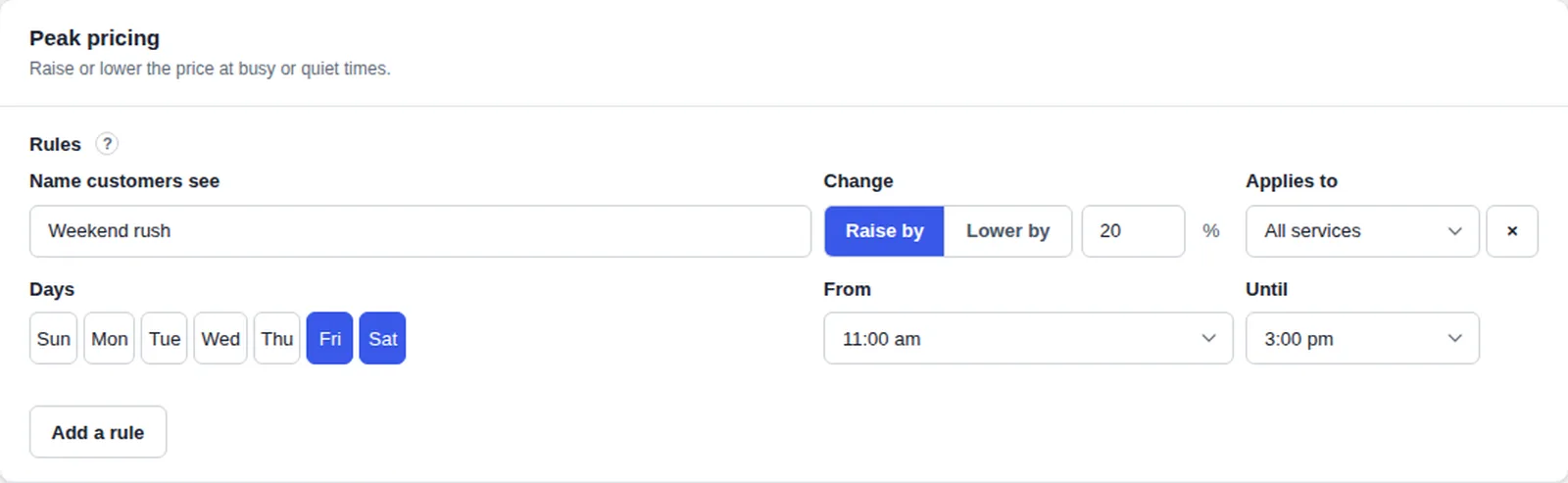
Peak pricing
Charge what your busy hours are worth.
- A rule for days and times: raise or lower the price by a percentage, for every service or one.
- Lower prices too, for the hours that stay empty.
- Off until you turn it on: you decide whether to use it at all.
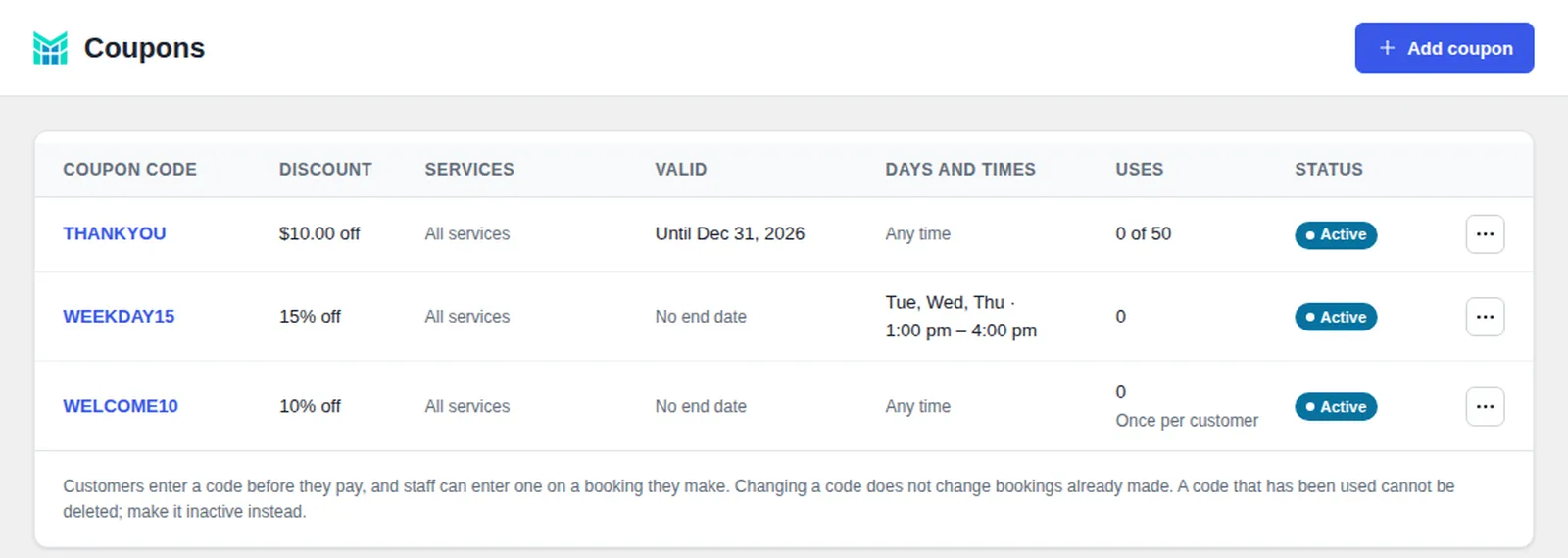
Coupon codes
Fill the quiet hours.
- A percentage or an amount off, with dates and a limit on uses.
- Only where you want it: chosen services, days and times, and one use per customer.
- A coupon box on the booking page, where customers type the code before they pay.
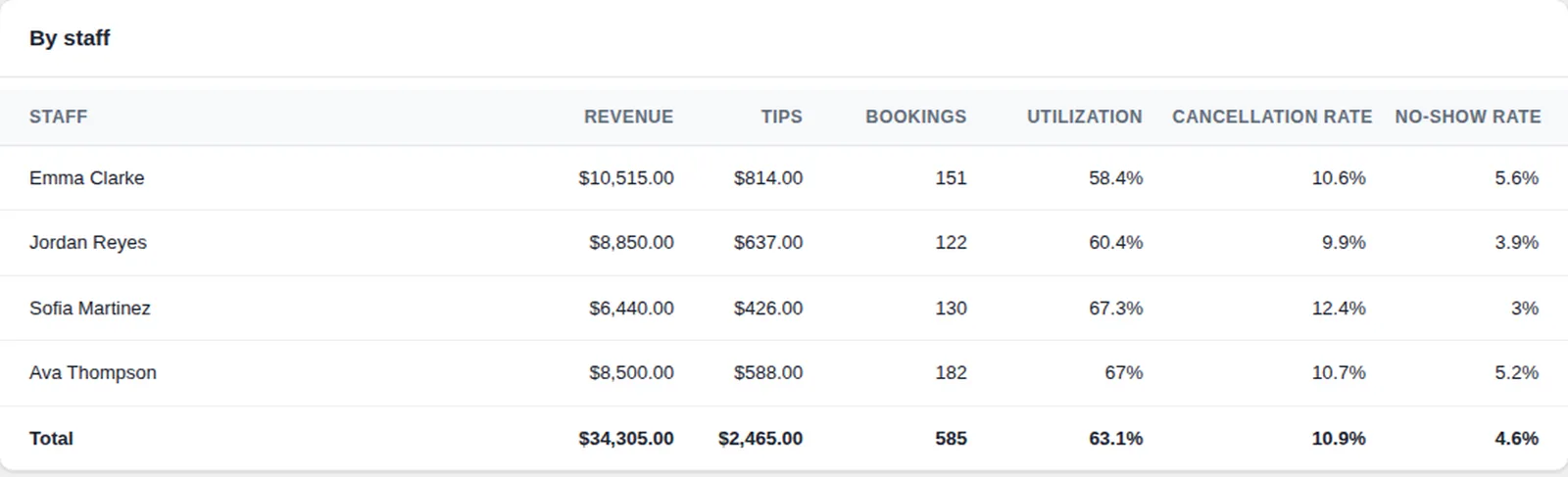
Your team
See what each person brings in.
- Revenue and tips for each staff member, not only for the whole shop.
- Utilization, cancellation and no-show rates for each person, and how many customers come back.
- Busy times: the hours that fill up and the hours that stay empty.
- Notices and calendars: an email for each staff member’s new, changed and cancelled bookings, and a phone calendar feed for each.
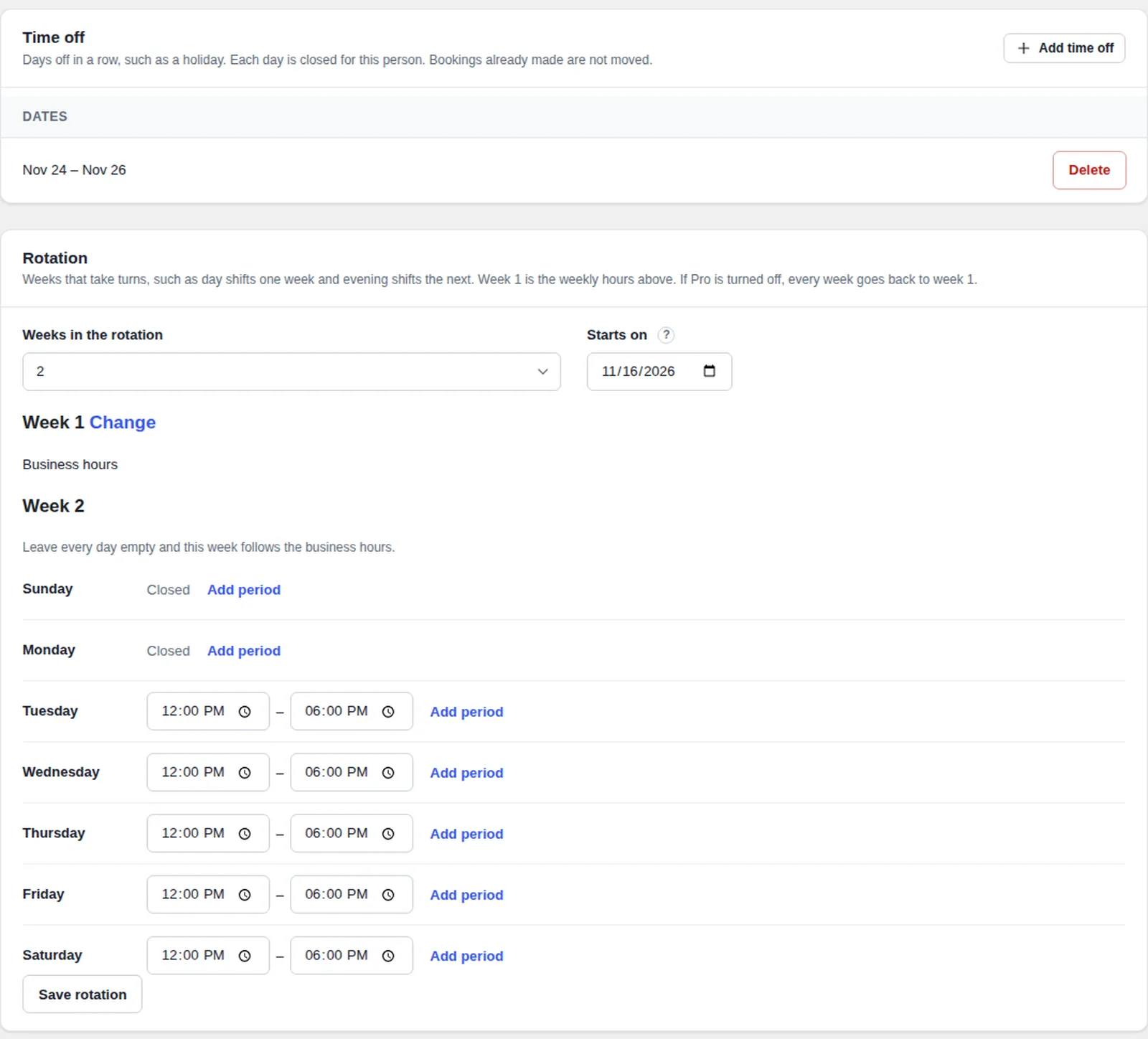
Shifts and time off
Rotas that change every week.
- Rotating shifts: one to four weeks in turn, such as day shifts one week and evening shifts the next, counted from a Monday you choose.
- Time off in one go: a whole holiday as one range of dates, for a staff member or for the whole shop.
- The free plugin keeps working: if Pro is turned off, every week goes back to week 1.
Hand over the desk
Manager
Money, the schedule and closing the shop for a day.
Front desk
Sees everything, makes and changes bookings, marks who arrived. Does not touch the money.
Staff
Sees only their own bookings.
Free and Pro
The free plugin runs a business on its own. Pro adds the parts for a team.
| Service (free) | Service Pro | |
|---|---|---|
| Staff without a limit, each with their own weekly hours and meeting link | Yes | Yes |
| Services with options, add-ons and free time in the middle | Yes | Yes |
| Online booking and payment with Stripe or PayPal, deposits | Yes | Yes |
| Schedule, bookings, desk bookings, refunds from the booking | Yes | Yes |
| Customers, tags, CSV import, analytics for the whole business, sales tax | Yes | Yes |
| Email wording and notices to customers | Yes | Yes |
| Rotating shifts | — | Yes |
| Time off entered as a range of dates | — | Yes |
| Manager, front desk and staff roles | — | Yes |
| Emails to staff about their bookings | — | Yes |
| A phone calendar for each staff member | — | Yes |
| Figures for each staff member | — | Yes |
| Automatic refunds | — | Yes |
| Peak pricing | — | Yes |
| Coupon codes | — | Yes |
| Review invitations | — | Yes |
| Your own email style | — | Yes |
| Price | Free | $99 a year; $79 a year for the first 100 customers |
How Pro compares
The paid versions of the WordPress plugins most used for booking appointments with a staff member, compared with Service Pro. The free versions are compared on the free version page.
| Service Pro | LatePoint Starter | Amelia Pro | Bookly Ultimate | |
|---|---|---|---|---|
| Price for one site | $99 a year; $79 a year for the first 100 | $99 a year | $199 a year | $199 a year |
| Refund to the card from the booking | Yes | Yes | Yes | Not stated |
| Automatic refund when a customer cancels | Yes | Not stated | Started by the owner | Not stated |
| Customer can leave the staff member to us (“any available”) | Yes | Yes | Not stated | Not stated |
| One service in several lengths, each with its own price | Yes | Yes | Yes | Length by the unit, with an add-on |
| A break in the middle of a service that takes other bookings | Yes | Not stated | Not stated | Not stated |
| Own online meeting link for each staff member | Yes | Not stated | Yes | Zoom and Google Meet integrations |
| Customer cancels from a link, no account needed | Yes | From a customer account | Yes | From a customer account |
| Mark arrived and no-show | Yes | Not stated | No-show tag only | Not stated |
| Rotating shifts (different hours in alternate weeks) | Yes | Not stated | Not stated | Not stated |
| Staff time off entered as a range of dates | Yes | Not stated | Not stated | Not stated |
| Manager, front desk and staff roles | Yes | Yes | Yes | Not stated |
| Email to the staff member for new, changed and cancelled bookings | Yes | Not stated | Confirmations only | Yes |
| Reports by staff member | Yes | Not stated | Totals only, not by staff | Not stated |
| Peak pricing by day and hour | Yes | Not stated | Yes | Yes |
| Review invitation after the appointment | Yes | Not stated | Not stated | A follow-up email |
Checked on October 12, 2026 on each vendor’s own website and on WordPress.org. “Not stated” means we could not find it in the vendor’s own pages. Prices are list prices for one site, before tax and discounts, in US dollars. The paid table leaves out what all four paid versions have: online payments, deposits, sales tax, add-ons, reminder email, coupon codes and a calendar feed for each staff member. Prices and features change, so check the vendors’ pages: LatePoint, Amelia, Bookly. Names belong to their owners.
$99 a year, or $79 for the first 100.
Service Pro is $99 a year. The first 100 customers pay $79 a year, and keep that price for as long as they keep renewing.
Service Pro goes on sale when Service is released.
Questions
Do I need the free plugin?
Yes. Pro adds to MarcoPlot Booking Service, which does the booking, the payments and the schedule, and adds its own pages to the free plugin’s menu.
What happens if I stop paying?
Pro switches off. Your settings and data are not deleted, the free plugin keeps working, and everything comes back as it was when you turn Pro on again. Rotating shifts stop and each staff member goes back to the weekly hours; the three roles go back to the administrator alone.
When can I buy it?
Service Pro goes on sale when Service is released. Until then you can try it in the Pro demo.