 MarcoPlot
Venue Pro · add-on for MarcoPlot Booking Venue
Earn more from the same capacity.
Charge more when you’re busy, fill the quiet hours, let refunds and reviews run themselves, and see which hours and spaces make your money.
- 14-day money-back guarantee, no questions asked
- No commission, ever. Guests pay you directly
- Your founding price is kept at every renewal
- Your bookings and settings are never deleted
Founding offer
$79 $99$99 / year
Founding price for the first 100 subscriptions
Buy Venue ProFinal price shown at checkout.
Try the Pro demo first →
Business analysis in the Pro demo, a karaoke bar with four rooms.
One or two extra bookings pay for a whole year of Pro.
A few dollars more on your Friday nights from peak pricing, or one empty hour filled with a coupon, and the year is covered. Everything after that is yours, because MarcoPlot never takes a share of your bookings.
Everything Pro adds
Seven features on top of the free plugin, all in one license.
Peak pricing
Raise or lower prices by a percentage for chosen days and hours.
Coupon codes
Percentage or amount off, with dates, use limits, spaces and hours.
Automatic refunds
A cancellation within your rules is refunded to the card by itself.
Business analysis
Utilization, busy hours, cancellations, no-shows, returning customers.
Manager and staff roles
Staff run the desk, managers handle the money, settings stay with you.
Review invitations
One email after the visit asks for a review on the page you choose.
Your email style
Your logo, color, header image and footer on every guest email.
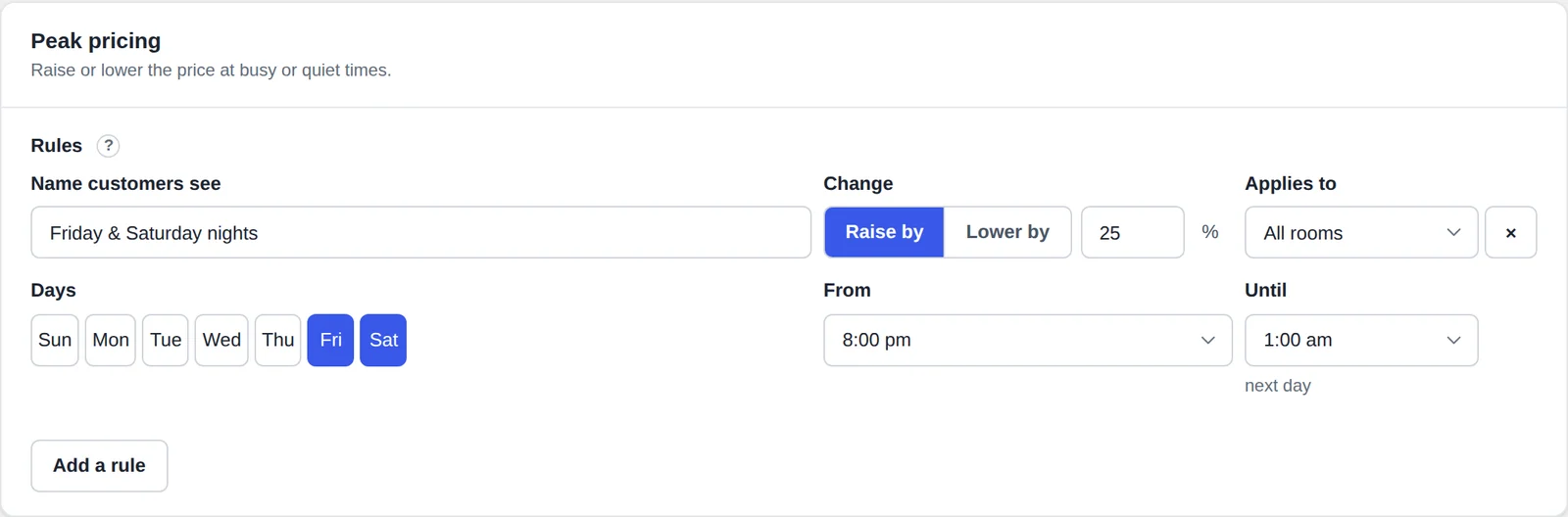
Peak pricing
Charge what your busy hours are worth.
- Friday and Saturday nights, 25% more: one rule, for all spaces or one.
- Lower prices too, for the hours that stay empty.
- Shown to the guest by name, on its own line before they pay, so nobody is surprised.
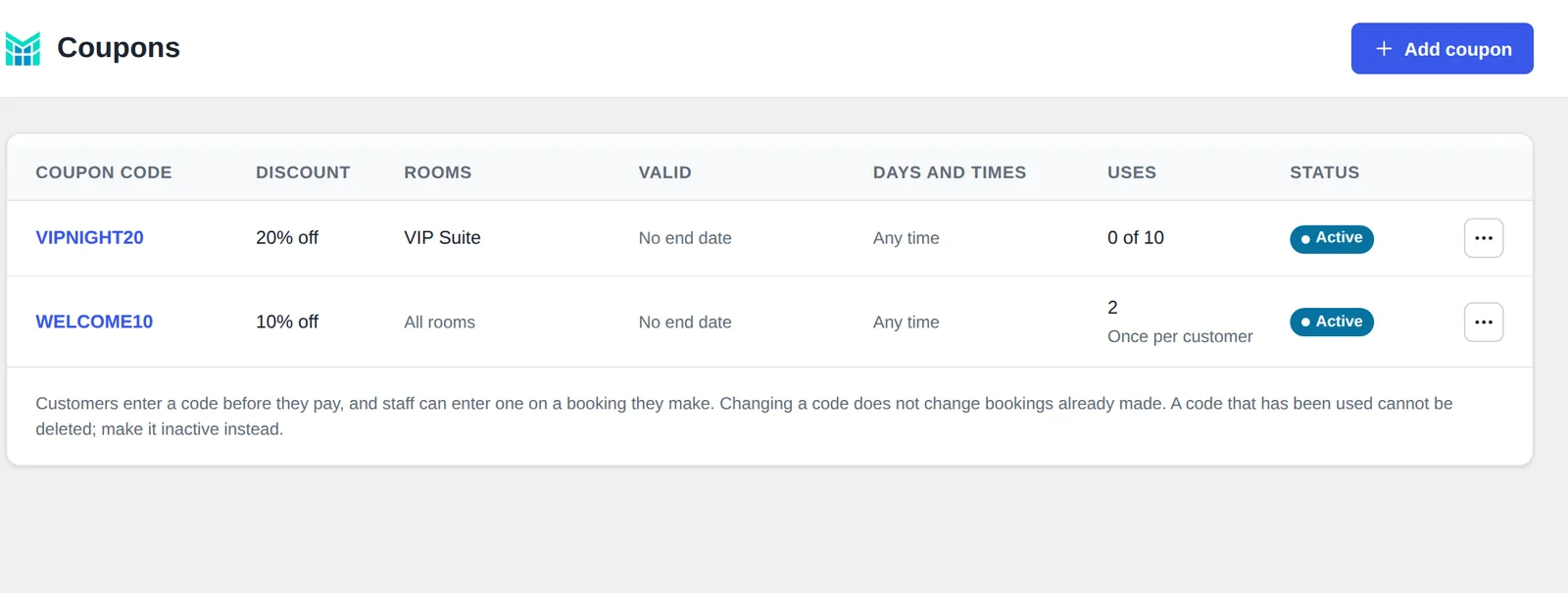
Coupon codes
Fill the quiet hours.
- A percentage or an amount off, with start and end dates and a limit on uses.
- Only where you want it: chosen spaces, chosen days and hours, one use per customer.
- Limits that hold: checked when the guest books, and a code’s last use can’t be taken twice. Works at the desk too.
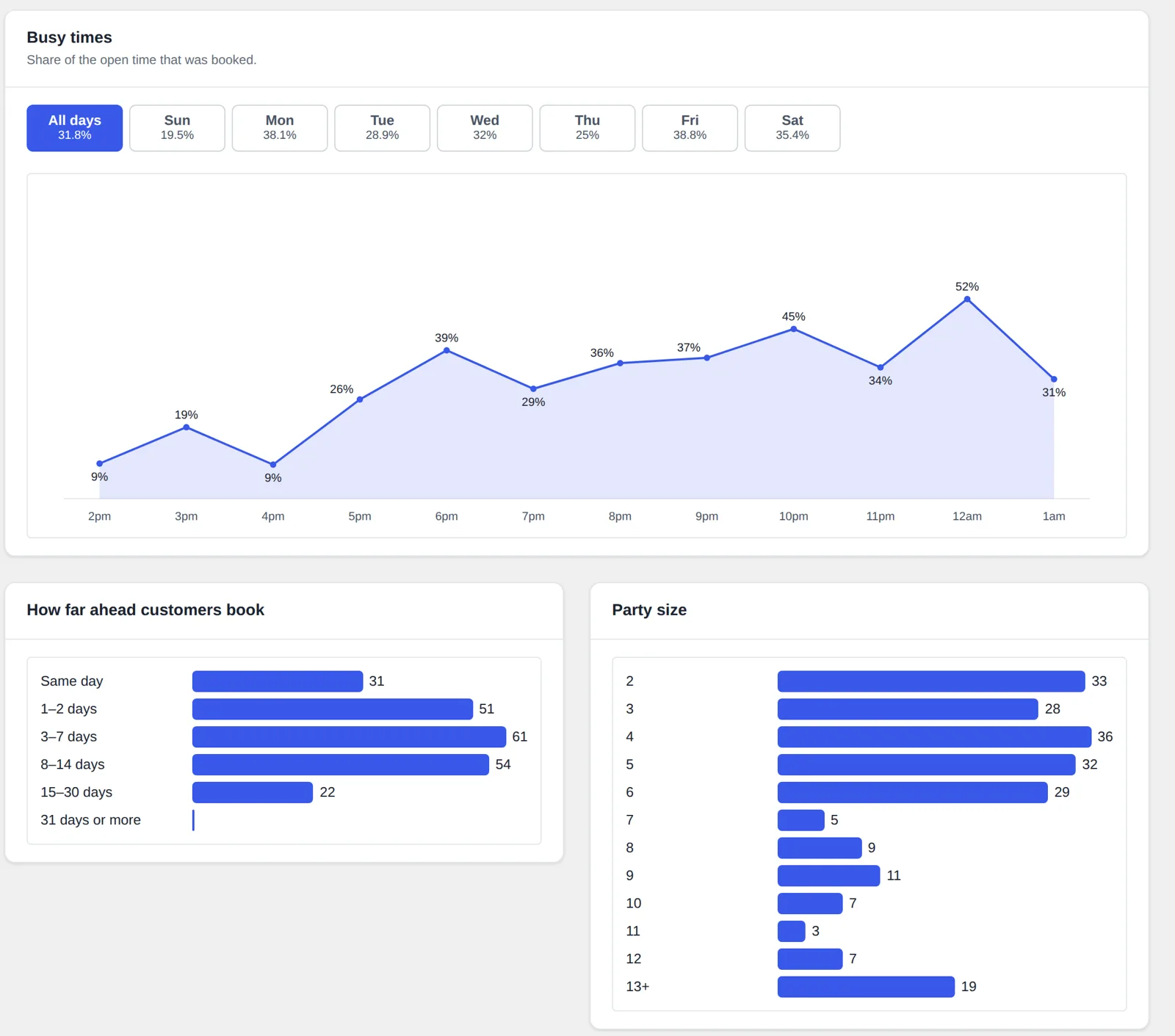
Business analysis
See which hours and spaces make money.
- Busy times: the share of open time booked, hour by hour, for every day or one day of the week.
- Utilization of each space, with its cancellation and no-show rates, over any dates.
- How far ahead customers book, the party sizes they come in, and how many come back.
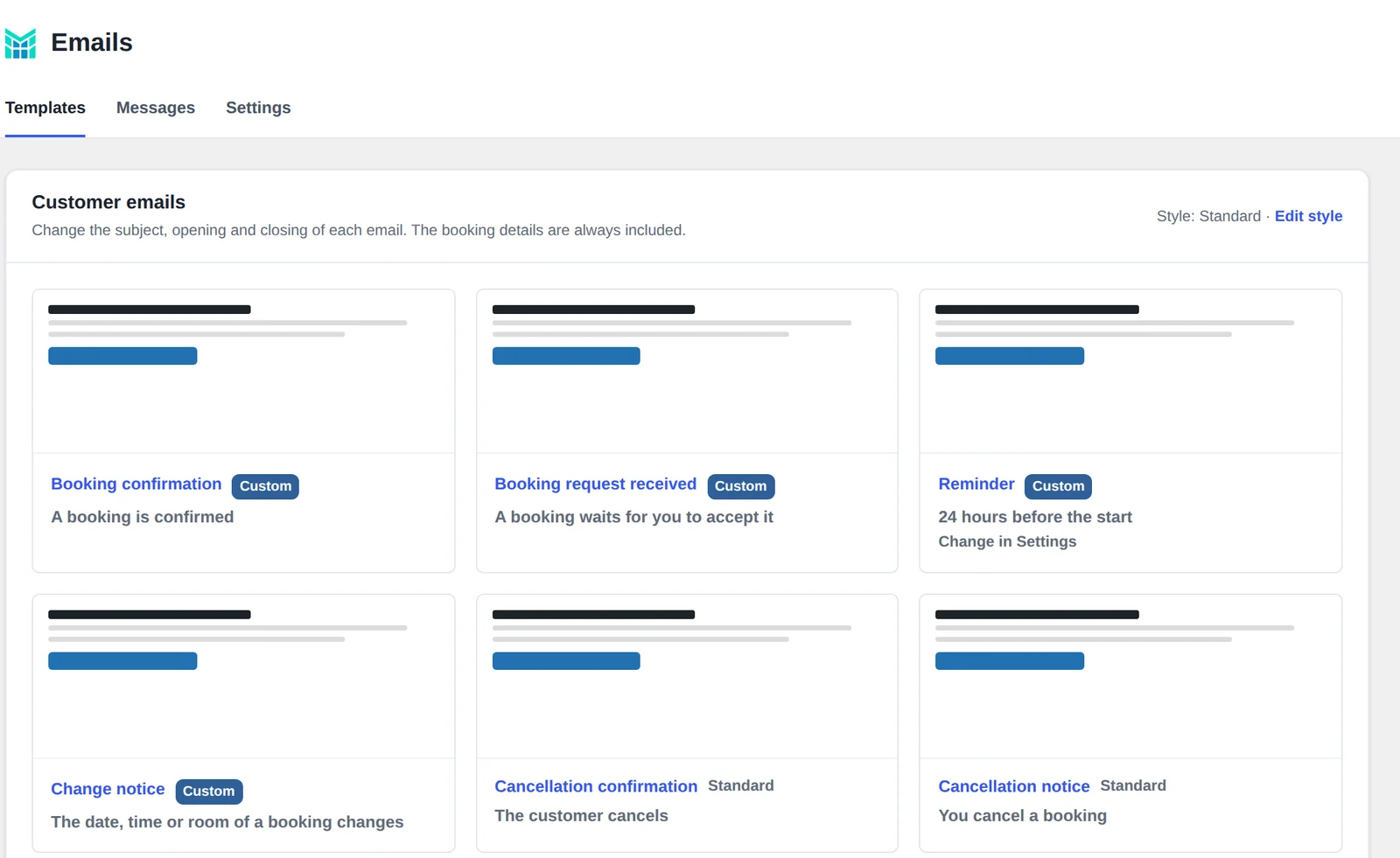
Emails and reviews
Look like your brand. Collect more reviews.
- Two layouts, your logo, a header image, your brand color, and a footer with your address, phone, website and social links.
- One setting for every guest email: confirmations, reminders, notices and review invitations.
- Review invitations: a few hours after the visit, one email asks the guest to review you on Google or any page you choose. Never after a no-show or a cancellation, and at most once a month per customer.
Hand over the desk
Automatic refunds
When a guest cancels within your rules, the money goes back to their card by itself. A refund that fails waits under “Needs your attention” and you get an email.
Manager and staff roles
Staff take bookings, take payment at the desk and mark no-shows. Managers also handle refunds, coupons, money reports and emails. Opening hours, spaces, prices and payment settings stay with you.
Free and Pro
The free plugin runs a venue on its own. Pro adds the parts that earn more and save time.
| Venue (free) | Venue Pro | |
|---|---|---|
| Online booking and payment with Stripe or PayPal, deposits | Yes | Yes |
| Schedule, bookings, walk-ins, refunds from the booking | Yes | Yes |
| Customers, tags, analytics, sales tax | Yes | Yes |
| Email wording, notices to guests, reminder, calendar feed | Yes | Yes |
| Peak pricing | — | Yes |
| Coupon codes | — | Yes |
| Automatic refunds | — | Yes |
| Business analysis and utilization | — | Yes |
| Manager and staff roles | — | Yes |
| Review invitations | — | Yes |
| Your own email style | — | Yes |
| Price | Free | $79 |
How Pro compares
The paid versions of the WordPress plugins most used for renting spaces by the hour, compared with Venue Pro. The free versions are compared on the free version page.
| Venue Pro | Booking Calendar Business Large | Appointment Hour Booking Professional | WooCommerce Bookings | |
|---|---|---|---|---|
| Price for one site | $99 a year; $79 a year for the first 100 | $349 once, with 6 months of updates | €59 a year | €223 a year, plus WooCommerce |
| Online payments (Stripe, PayPal) | Yes | Yes | Yes | Through separate payment extensions |
| Deposits | Yes | Yes | Not stated | With the paid Deposits extension |
| Refund to the card from the booking | Yes | Not stated | Not stated | Not stated |
| Automatic refund when a guest cancels | Yes | Not stated | Not stated | Not stated |
| Sales tax | Yes | Not stated | Not stated | Yes |
| Book a space by the hour for a party size | Yes | Yes | Yes | Yes |
| Start times offered | Tested by simulation, or fixed sessions | Fixed list, or a start and end the guest picks | Fixed grid by service length | Fixed blocks, or a range the guest picks |
| Cleanup time between bookings | Yes | Yes | Not stated | Yes |
| Several spaces side by side on one schedule | Yes | Not stated | Not stated | Not stated |
| Guest cancels from a link | Yes | Not stated | Yes | Not stated |
| Your own questions on the booking form | Yes | Yes | Yes | Not stated |
| Reminder email | Yes | Not stated | Yes | Yes |
| Peak pricing by day and hour | Yes | By season and weekday | Not stated | By day of the week |
| Coupon codes | Yes | Yes | Yes | Yes |
| Manager and staff roles | Yes | $649 MultiUser edition | Not stated | Not stated |
| Review invitation after the visit | Yes | Not stated | A follow-up email | Not stated |
| Utilization of each space | Yes | Not stated | Not stated | Not stated |
Checked on October 6, 2026 on each vendor’s own website and on WordPress.org. “Not stated” means we could not find it in the vendor’s own pages. Prices are list prices for one site, before tax and discounts, in the currency the vendor showed us. Prices and features change, so check the vendors’ pages: Booking Calendar, Appointment Hour Booking, WooCommerce Bookings. Names belong to their owners.
Founding offer
$79 a year, for as long as you stay.
The first 100 subscriptions keep the $79 price at every renewal, as long as the subscription runs without a break. After that, Venue Pro is $99 a year.
Pays for itself in a booking or two.
14-day money-back guarantee
Try Pro on your own site. If it isn’t right for you, get a full refund within 14 days of your first purchase, no questions asked, from the refund page. No email to write, no one to convince.
Venue Pro, one website
$79 $99$99 / year
Founding price for the first 100 subscriptions
Full refund within 14 days. Prices in US dollars, before tax; the final price and any tax are shown at checkout. See the terms of sale and the terms of use.
Questions
Can I get my money back?
Yes. Within 14 days of your first purchase you get a full refund, without giving a reason: enter your license key and the email you paid with on the refund page. Pro turns off at once. Renewals are not covered.
Do I need the free plugin?
Yes. Pro adds to MarcoPlot Booking Venue, which does the booking, the payments and the schedule. Install the free plugin first (from WordPress.org, or search for it under Plugins in your WordPress), then Pro.
How do I get Pro after paying?
You pay on Stripe’s checkout page. Your license key appears as soon as you have paid, with a button to download Pro, and is emailed to you. Upload Pro under Plugins, then enter the key under Venue Bookings → Pro license. Updates then come from marcoplot.com and install from the Plugins page like any other update.
What happens if I stop paying?
Pro switches off seven days after the subscription ends. Nothing is deleted: your settings, coupons and bookings stay, the free plugin keeps working, and Pro comes back as it was when you renew.
Can I use one license on more than one site?
A license is for one website address. A copy of the site at another address, such as a staging site, needs its own license; for testing, use the free plugin. To move Pro to a new site, press Deactivate on the old one first.
Does MarcoPlot take a share of my bookings?
No. Guests pay into your own Stripe or PayPal account. The subscription is the only thing you pay us.